What is a Computer?
- Duration: 4 min - Learning Goal: After this, you can say what a computer is and why it is "fast but not smart".
- Core Content: - A computer is a machine that follows instructions. - It takes information in, works on it, and gives a result out. - It is extremely fast. It can do billions of small tasks in one second. - But it has no feelings and no common sense. It only does exactly what it is told. - If instructions are wrong, the result is wrong. - Key Terms: Computer (a machine that follows instructions), Instruction (a clear command), Data (information the computer uses).
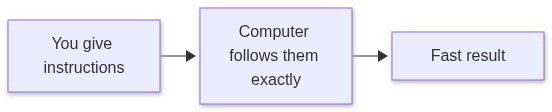
- Diagram:
Memory Shortcut · short trick
"Computer = Super-Fast Obedient Helper." It does not think. It follows.
"Computer = Super-Fast Obedient Helper." It does not think. It follows.
- Image: Flat illustration of a small friendly robot holding a checklist next to a laptop, bright colours. - Visualization (Speed Race):
Interactive real-time simulator (HTML/JS widget)
- Quick Check: (1) True or False: A computer can decide things without any instructions. Answer: False. (2) What two words describe a computer best? Answer: Fast and obedient.
▶ DETAILED LESSON CONTENT (main reading material, 1000+ words)
1. Robo Bittu's Big Question
Robo Bittu opens his eyes for the first time and looks around the classroom. He sees a laptop, a projector, a clock and a phone on the teacher's desk. "Are all of these computers?" he asks. "And what exactly am I?" To help Bittu, we need to answer one simple question first: what is a computer? By the end of this lesson, you will not only know the answer, you will be able to explain it to your friends and family in your own words.
2. What Exactly Is a Computer?
A computer is a machine that follows instructions to work with information. That is the whole idea. It does not matter whether the machine is as big as a room or as small as a coin. If it can take in information, follow a list of instructions, and give you a result, it is a computer.
The information a computer works with is called data. Data can be numbers, words, pictures, songs, videos, or even your finger taps on a touch screen. The list of instructions is called a program (or software). When you open a game on your phone, you are asking the computer to follow the instructions that make that game.
Here is a very important point. A computer does not understand things the way you do. When you read the word "dog", you imagine a furry animal that barks. A computer only sees a pattern of electrical signals. It follows the rules it was given, and it never gets tired, bored or distracted. This is why computers are so useful: they are fast, careful and never complain.
3. The Four Jobs of Every Computer
Every computer, big or small, does four basic jobs. Learn them well because we will use them throughout this course.
| Job | What It Means | Simple Example |
|---|---|---|
| Input | Taking information in | Typing on a keyboard, tapping a screen, speaking to a microphone |
| Process | Working on that information using instructions | Adding two numbers, checking a password, turning light into a photo |
| Output | Showing or giving the result | Text on the screen, a sound from the speaker, a printed page |
| Storage | Saving information to use later | Saving a photo, keeping your game progress, storing a document |
Imagine a school canteen. A student tells the canteen uncle what they want (input). The uncle prepares it (process). He hands over the sandwich (output). And he writes in his notebook what was sold today (storage). Computers behave like this canteen uncle, only much faster.
4. Fast, But Not Smart
Many people think computers are "smart" or "intelligent". The truth is a little different. A computer is fast, not smart. Let us see why with a small example.
Suppose you tell a human friend, "Make me a cup of tea." Your friend already knows where the kettle is, what tea means, how much sugar you like and when to stop. Now tell a computer-controlled robot the same sentence. It will freeze, because the sentence is missing hundreds of details: Which kettle? How much water? How long to boil? When to add milk? A computer needs every step written clearly, in the correct order.
Look at this comparison:
| Instruction to a human | Instruction a computer needs |
|---|---|
| "Make tea." | 1. Go to the kitchen. 2. Pick up the kettle. 3. Fill it with 2 cups of water. 4. Put it on the stove. 5. Turn on the flame. 6. Wait 4 minutes. ... and so on. |
| "Draw a circle." | "Start at point (50, 50). Move in a curve with radius 20 until you return to the start." |
| "Sort the list." | "Compare the first two numbers. If the first is bigger, swap them. Repeat for the whole list. Repeat the whole process until nothing changes." |
So when we say a computer is "fast but not smart", we mean: it can do millions of small steps in a blink, but someone must tell it exactly which steps to take. Later in this course you will become that someone.
5. Humans and Computers: Who Is Better at What?
Neither one is always better. They are good at different things.
| Skill | Human | Computer |
|---|---|---|
| Speed of calculation | Slow | Extremely fast |
| Accuracy on long tasks | Makes mistakes when tired | Same accuracy every time |
| Creativity and imagination | Excellent | Only follows given rules |
| Understanding feelings | Excellent | Does not feel |
| Working non-stop | Needs rest | Can run for days |
| Deciding without instructions | Yes (common sense) | No |
The best results come when people and computers work together. A doctor uses a computer to scan thousands of images quickly, and then uses her own knowledge to decide the treatment.
6. A Short Story of Computers
Long ago, people counted with stones and sticks. Then came the abacus, a frame with beads that helped traders calculate. In the 1800s, a British inventor named Charles Babbage designed a machine called the Analytical Engine, which had ideas very similar to modern computers. Ada Lovelace wrote notes for it that are often called the first computer program, so she is celebrated as one of the first programmers.
In the 1940s, early electronic computers like ENIAC were built. They were so large that they filled an entire room and weighed several tonnes, yet they were far slower than the phone in your pocket today. Over the decades, parts became smaller and smaller, and computers moved from rooms to desks, then to laps, and finally to our hands.
7. Different Kinds of Computers
| Type | Where You See It | What It Is Good At |
|---|---|---|
| Desktop and laptop | Home, school, office | General work, studying, coding |
| Smartphone and tablet | In your hand | Communication, apps, photos |
| Server | Hidden in data centres | Serving websites, storing data for millions of people |
| Supercomputer | Research labs | Weather forecasting, space and science calculations |
| Embedded computer | Inside a microwave, washing machine, TV | One fixed job, done reliably |
8. Common Myths (and the Truth)
- Myth: "A computer is only a laptop or a desktop." Truth: Phones, ATMs and smart TVs are computers too. - Myth: "Computers think by themselves." Truth: They follow instructions written by people. - Myth: "The screen is the computer." Truth: The screen only shows the output. The real work happens inside. - Myth: "If a computer gives a wrong answer, the computer is broken." Truth: Very often the instructions or the input were wrong.
9. Try This at Home (5-Minute Activity)
Pick a simple daily task, such as brushing your teeth. Write it as a list of tiny, exact steps as if you are instructing a robot who knows nothing. Ask a family member to follow your steps exactly without using common sense. You will quickly find missing steps, such as "Open the cap of the toothpaste". That is exactly how computers experience instructions.
10. Quick Recap
- A computer is a machine that follows instructions to work with data. - It does four jobs: input, process, output and storage. - It is very fast and accurate, but it cannot think or decide without instructions. - Computers come in many shapes, and many are hidden inside everyday devices. - You, as a coder, will become the person who gives computers their instructions.
skill game · 30 seconds · real points
+30 xpWhich habit most improves retention a week after learning something?
Completion gate
45s of active reading left
Verified focus.The timer pauses when this tab loses visibility, so the gate can't be farmed.
Need a break? Bank the streak with an arena duel — timed challenges keep the multiplier alive.